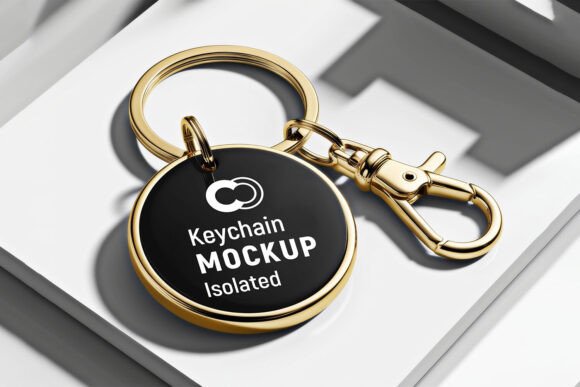
Showcase Designs with a Golden Keychain Mockup
A product mockup can make the difference between a concept that feels flat and one that looks ready for market. Among the many presentation tools available, the Realistic Golden Keychain Mockup PSD stands out as a versatile asset for designers, small business owners, and content creators. It offers a polished way to display logos, branding elements, or custom artwork in a setting that feels both premium and approachable.
Instead of describing a design in abstract terms, this mockup places your work onto a tangible object. Viewers see a golden keychain with realistic lighting, shadows, and metal texture. The result is a presentation that communicates quality and attention to detail without requiring a physical prototype.
What Makes This Mockup Valuable
At its core, the Realistic Golden Keychain Mockup PSD is a layered Photoshop file that lets you insert your design into a pre-built scene. The golden finish gives the keychain a warm, luxurious appearance that works well for brands aiming to convey elegance or reliability. The PSD format means you can adjust colors, backgrounds, and reflections to match your specific vision.
The value lies in its efficiency. Creating a realistic photograph of a custom keychain would require 3D modeling, printing, photography equipment, and editing skills. With the mockup, you get a photorealistic result in minutes. This speed is especially useful for entrepreneurs testing multiple design variations or freelancers presenting options to a client.
Another strong point is the sense of scale. A keychain is a small object, and seeing a design on it helps people understand how it will look in real life. Unlike flat digital renders, this mockup simulates how light interacts with curved metal surfaces, giving your work a tactile quality that static images lack.
Who Benefits Most from a Keychain Mockup
The audience for this mockup is broader than you might expect. While it naturally appeals to graphic designers and branding specialists, several other groups find it equally useful.
- Small business owners who sell promotional merchandise can present keychain concepts to clients without holding inventory.
- E-commerce sellers on platforms like Etsy or Amazon can create listing images that look professional and trustworthy.
- Event planners designing custom giveaways for weddings, conferences, or corporate events can preview the final product.
- Hobbyists and creators experimenting with logo designs or personal projects can see their work on a real-world object.
- Educators teaching product design or branding can use the mockup to demonstrate how packaging and merchandise support brand identity.
For all these users, the Realistic Golden Keychain Mockup PSD eliminates guesswork. Instead of imagining how a flat logo will wrap around a curved metal surface, you see it immediately. This clarity reduces revisions and helps decision-makers feel confident about moving forward.
Practical Ways to Use the Mockup
Understanding the technical side matters less than knowing how to apply it. Here are several realistic scenarios where this mockup delivers strong results.
Branding Proposals for Clients
When pitching a brand identity, you want to show how the logo works beyond a business card. Including a golden keychain mockup in your proposal signals that you have considered merchandise and real-world applications. A client who sees their logo on a premium object like a gold keychain is more likely to approve the direction of your work.
Product Listings for Online Stores
Physical product photography takes time and money. If you sell custom keychains, using the mockup for your primary listing image lets you maintain a consistent, high-quality look across your catalog. You can also generate images for social media ads or promotional banners without needing to photograph every variation.
Social Media Content and Portfolio Pieces
For freelancers and designers, a polished mockup adds credibility to your portfolio. Posting a realistic golden keychain mockup on Instagram or Behance shows potential clients that you understand presentation and detail. It also gives you content that stands out in feeds filled with flat digital art.
Personal Projects and Gifts
Even if you are not a professional designer, you might want to create a custom keychain as a gift or personal keepsake. Using the mockup, you can experiment with initials, dates, or small illustrations before ordering a physical version. This saves money and ensures you are happy with the final design.
What to Consider Before Using the Mockup
While the Realistic Golden Keychain Mockup PSD is easy to use, a few considerations will help you get the best results.
- Software requirements. You will need Adobe Photoshop or an alternative that supports PSD files with smart objects. Free tools like GIMP can sometimes handle these files, but the editing experience may be less smooth.
- File organization. Most PSD mockups come with labeled layers. Take a moment to understand which layers are for your design and which control lighting or background. Small adjustments to shadows or reflections can dramatically improve the realism.
- Design dimensions. Ensure your artwork fits the smart object area properly. Stretching a low-resolution image will make the keychain look blurry. Use vector files or high-resolution PNGs for the cleanest result.
- Color matching. The golden metal surface will interact with your colors. Test your design with different brightness levels to see how it behaves. Sometimes increasing contrast helps the design pop against the metallic background.
- License terms. Check whether the mockup is free for commercial use or requires attribution. Most premium mockups come with a license that covers client work, but it is worth verifying before publishing.
Tips for Beginners Getting Started
If you are new to working with PSD mockups, the process is simpler than it looks. Open the file in Photoshop and locate the smart object layer—it is usually named something like "Insert your design here." Double-click that layer, paste your artwork, save the changes, and the mockup updates automatically. That is essentially all you need to do for a basic result.
For a more polished outcome, experiment with the additional controls included in the file. Some mockups let you adjust the background color, shadow intensity, or even the angle of the keychain. These small tweaks help your presentation feel custom rather than generic.
If you do not own Photoshop, consider using a free tool like Photopea. It supports smart objects well enough for most mockup work. The golden keychain mockup will retain its realistic appearance as long as you maintain the layer structure.
Why Realism Matters in Mockup Presentation
A common mistake beginners make is using overly simple mockups that look obviously digital. The Realistic Golden Keychain Mockup PSD avoids this by including detailed elements like subtle scratches, gradient reflections, and depth-of-field effects. These features mimic how a real keychain behaves under natural light.
When a client or customer sees a realistic mockup, they subconsciously trust the quality of the product. It signals that you care about the details, which reflects well on your brand or service. In a crowded marketplace, that trust can be the factor that leads to a sale or a project approval.
From a creative perspective, working with realistic mockups also improves your design instincts. You start thinking about how a logo will wrap around curved surfaces, how small text will read at actual size, and how metallic backgrounds affect color perception. These insights carry over into other design work.
Final Observations on the Golden Keychain Mockup
The Realistic Golden Keychain Mockup PSD is a practical tool for anyone who needs to present custom keychain designs in a professional, appealing way. Its ease of use, combined with the premium look of a golden metal finish, makes it suitable for a wide range of applications—from client pitches to personal projects.
Because the mockup saves time and reduces the need for physical samples, it is especially valuable for small businesses and freelancers working with limited budgets. The ability to iterate quickly on design ideas without waiting for manufacturing or photography means you can refine your work until it feels right.
Whether you are designing merchandise for a brand, listing products in an online store, or simply exploring your creativity, this mockup helps you communicate your vision clearly. And in design, clear communication is often the difference between an idea that stays on screen and one that becomes reality.