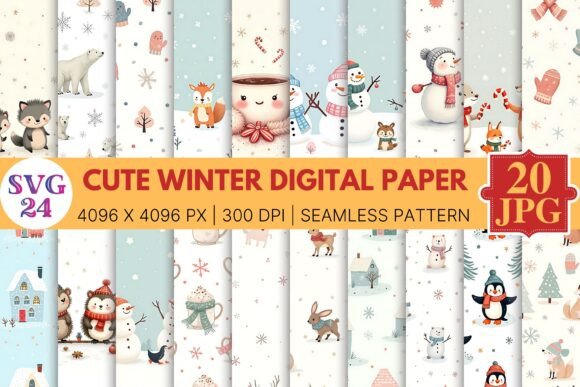
Cute Winter Digital Paper: A Practical Guide to Getting It Right
Seasonal design assets like Cute Winter Digital Paper have become essential tools for creators, small business owners, and hobbyists alike. Whether you're designing holiday social media posts, crafting personalized gifts, or building a winter brand identity, the right paper can set the tone perfectly. Yet as the market swells with options from independent designers and large marketplaces, it is easy to make choices that lead to frustration instead of satisfaction. A pixelated print, a licensing misunderstanding, or a mismatched theme can derail an entire project. Understanding what lies beneath the attractive preview image helps ensure your creative process stays smooth and your finished work looks exactly as envisioned.
Beyond the Pretty Preview: Why File Quality Matters More Than Looks
It is tempting to choose a design based purely on its visual appeal. A snowy woodland scene, a cozy plaid pattern, or cheerful winter florals all catch the eye quickly. The mistake comes from assuming that what looks sharp on a phone screen will look equally crisp on a printed card or flyer. Screen resolution typically sits at 72 DPI, while professional printing requires 300 DPI. Dragging a low-resolution image into a design program and scaling it up exposes pixelated edges and ruins the polished effect you intended.
Before downloading or purchasing, check the technical specifications explicitly. The file should state 300 DPI for print projects. Also note the difference between JPEG and PNG formats. JPEG files are compressed and may introduce artifacts or lack transparency, while PNG files retain sharpness and allow for transparent backgrounds, which is useful when layering papers behind text or other graphics. A blogger designing a printable winter planner should choose 300 DPI PNG or PDF files for crisp results. A social media manager creating a one-time Instagram post may be fine with smaller JPEGs, but investing in high-resolution assets gives you the flexibility to repurpose them later without issue.
The Hidden Trap of Licensing: Know Your Usage Rights
This may be the most overlooked detail when selecting Cute Winter Digital Paper. You find a beautiful set, download it, and use it to create inventory for your small business. You print greeting cards, sell them at a holiday market, and feel proud of your work. Months later, you discover the license only permitted personal projects. At best, you receive a polite request to stop selling. At worst, it involves legal action and a hit to your reputation.
Licensing is not negotiable, and it is not always obvious. Before using any digital paper commercially, confirm the license type:
- Personal Use: Allowed for non-sellable projects like gifts, personal scrapbooks, or classroom decorations.
- Commercial Use (CU): Permits use in products you sell, such as cards, mugs, or digital templates. Pay attention to quantity limits since some licenses cap the number of sales.
- CU4CU: Rarely applies to digital papers, but permits you to sell the design itself as part of a new product, requiring careful attention to terms.
Even free digital paper packs often come with a license. Always read the documentation included in the download or the product description on the marketplace. If you operate a growing business, consider purchasing extended licenses, which typically allow unlimited or higher-volume commercial use. This small upfront investment protects your business and respects the designer's work.
Designing with Intention: Avoiding the Mismatch Trap
With so many charming winter patterns available, it is easy to collect more than you need. A folder full of diverse designs may feel like creative abundance, but using too many strong patterns together in one project creates visual clutter. A card filled with competing plaids, snowflakes, and animal prints overwhelms the eye and obscures your message.
Better results come from intentional curation. When selecting Cute Winter Digital Paper for a single project, establish a clear color palette and stick to two or three complementary patterns. Choose one dominant paper, such as a large-scale winter floral or tartan plaid, and pair it with something subtle, like a coordinating solid color or a delicate polka dot. Use the strong pattern as an accent on a card base or banner, and place the subtle paper where text or focal images sit.
For example, a winter wedding invitation set benefits from a sophisticated watercolor pine pattern on the main card and a matching cream paper on the envelope liner. Combining that with a bright, cartoonish snowman pattern would confuse the theme and dilute the elegance. Clarity in your design vision saves time and produces a more professional result.
Understanding Formats: Seamless Tiles Versus Printable Sheets
A common frustration arises when the downloaded file does not behave as expected in your design software. Many users purchase a pack labeled "12x12 inch digital paper" only to try using it as a repeating background in a document and find awkward seams or sizing issues. Understanding the two main format types helps avoid this confusion.
Seamless tiles are small, carefully constructed patterns designed to repeat infinitely without visible borders. They are ideal for digital backgrounds, fabric printing, gift wrap, or website elements. If your project requires a wallpaper effect, a seamless tile is the correct choice. Single sheets are full-size designs, commonly 12x12 inches or 8.5x11 inches, intended for direct printing onto specific mediums like scrapbook pages or card fronts.
Using a seamless tile incorrectly in a word processor often leads to scaling issues or visible cuts. Instead, use design programs like Photoshop, Illustrator, or Canva, where you can upload the tile and apply it as a pattern fill. If you only need a single sheet for a card base, choose a full-size printable sheet rather than trying to piece together a tile. Identifying your output medium before you download saves significant editing time.
The Reality of Print: Color, Contrast, and Paper Stock
Digital screens are backlit and typically calibrated for a wide color gamut. Printers use a different color model, and home printers vary widely in quality and calibration. A delicate winter blue that looks perfect on your monitor may print as a muddy purple or a faded gray on standard office paper.
This mismatch leads to disappointment and wasted materials. To minimize surprises, take several practical steps. First, check whether the digital paper is provided in RGB or CMYK. RGB is standard for screens, while CMYK is used for professional print. Some designers now provide both, giving you flexibility. Second, perform a soft proof within your design software if it supports the feature. This simulates how your colors will look on a specific printer and paper combination.
Most importantly, do not skip test prints. Print a small section of your design on the exact paper stock you plan to use for the final product. Matte photo paper, glossy cardstock, and standard copy paper each render colors differently. This test allows you to adjust contrast or brightness before producing a full batch.
Additionally, consider contrast carefully. Many winter digital papers feature light pastels, whites, and soft grays. These can look beautiful but make it difficult to read text placed directly on top. If you are layering a heading or quote, choose a paper with a clearly defined lighter and darker area, or add a subtle shadow or solid text box to ensure readability. Nothing undermines a polished design faster than text that strains the eyes to read.
What to Check Before You Click Buy or Download
Developing a habit of reviewing key details before purchasing or downloading prevents most common issues. Here is a short checklist to keep in mind:
- Read the full product description. Look for file format, resolution, size, and the exact number of patterns included.
- Examine the preview images carefully. Zoom in to check for pixelation or blurriness. Notice whether watermarks obscure the pattern, making it hard to judge.
- Verify the license terms. If the product page lacks a clear license section, contact the seller before using it in any commercial work.
- Read customer reviews. Pay attention to any mentions of print quality, color accuracy, or file usability. Honest reviews often reveal details the description leaves out.
- Define your project scope first. A single holiday card can tolerate a generic free pack. A full product line for a brand requires cohesive, high-quality assets that align with your color scheme and aesthetic.
Taking these steps feels like extra effort in the moment, but it saves countless hours of troubleshooting later. The right digital paper should enhance your creativity, not limit it.
Putting It All Together
Cute Winter Digital Paper brings warmth and personality to a vast range of projects, from personal crafts to professional marketing materials. The key to using these assets effectively lies not in downloading the largest bundle, but in making informed choices. By prioritizing resolution and file quality, respecting licensing terms, curating designs with intention, understanding format differences, and preparing for the realities of print, you set yourself up for success from the start. Whether you are a seasoned designer or someone exploring digital crafting for the first time, a thoughtful approach ensures that your winter projects turn out exactly as charming as you imagined.