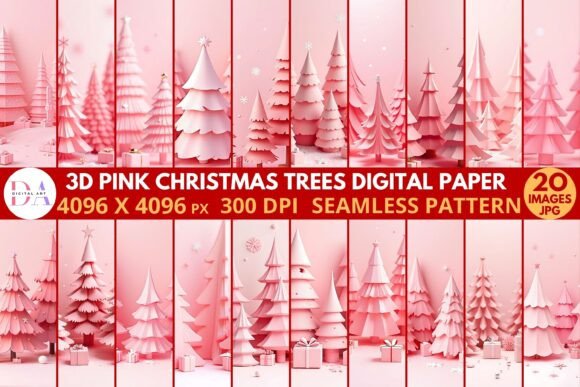
Getting the Most from 3D Pink Christmas Trees Digital Paper
If you have come across 3D Pink Christmas Trees Digital Paper while searching for unique holiday design resources, you likely noticed how different it looks from standard flat patterns. This digital paper features three-dimensional pink Christmas tree motifs, often with shading, highlights, and depth that mimic real textures. The effect can be striking, but using it well requires more than just downloading and dragging it into your project. Many people find out too late that what looked great in preview does not hold up in print, or that the file format does not match their workflow. Let us walk through the most common missteps and how to get the best results from this resource.
What Exactly Is 3D Pink Christmas Trees Digital Paper?
At its core, this is a set of digital background files—typically JPG or PNG—featuring Christmas tree designs with a three-dimensional appearance. The pink palette may range from pastel blush to bold magenta, and the trees may be arranged in repeating patterns or scattered across the paper. Designers, crafters, and small business owners use it for greeting cards, gift wrap, scrapbooking, social media graphics, party decor, and product packaging. The appeal lies in combining a traditional holiday symbol with a modern, non-traditional color. The 3D effect adds a tactile, almost layered look that flat illustrations cannot replicate.
However, because these files are pre-rendered, they come with fixed lighting and perspective. That baked-in depth can work beautifully or create problems depending on how you use them.
Mistake One: Assuming All Files Are Print-Ready
A frequent misunderstanding is that because the paper looks crisp on screen, it will print just as sharply. Digital paper sold online may come in 150 DPI, 200 DPI, or 300 DPI. The first is fine for screen use, but for anything you intend to print—cards, labels, wrapping paper—you need at least 300 DPI. If you purchase a set advertised as "high resolution," confirm the specific DPI before you buy. Some marketplaces list 150 DPI as high, which is true for web use, not for print.
What to check: Open the file properties and look at the pixel dimensions. For a standard A4 or letter-sized print at 300 DPI, you need roughly 2480 x 3508 pixels. If your file is significantly smaller, the printed result will look soft or pixelated.
Better approach: Before using the paper in a print project, do a small test print on plain paper. Examine the tree edges and the background gradient. If you see jagged lines or blurring, that file is not suitable for that purpose. For professional client work, only use files that meet 300 DPI or higher.
Mistake Two: Overlooking Color Consistency
Pink is a tricky color in digital media. A hot pink tree that looks vibrant on your monitor may print muddy or shift toward orange on another device. The 3D shading in these papers relies on subtle gradients from light to dark pink. If your screen is not calibrated, you may be editing a file that is actually warmer or cooler than you think. Worse, if you are designing for a client who uses a different monitor, the result can be a surprise at delivery.
Practical tip: Download a free ICC color profile for your printer paper type and soft-proof the digital paper in your editing software. If you design in sRGB, most online sellers provide files in that space, but check the product description. Avoid working on a laptop in a brightly lit room without adjusting brightness. A simple monitor calibration tool or even an online calibration guide can reduce mismatch headaches.
If you plan to use the paper on a website or social media, remember that different browsers and phones render pink differently. Test your final graphic on at least two devices before publishing.
Mistake Three: Ignoring the Fixed Lighting Direction
Because 3D Pink Christmas Trees Digital Paper has a rendered 3D effect, the light source in the image is already set. If you place text or cut-out elements over the paper, the lighting in your added content may conflict with the paper's light direction. For example, a tree with a shadow falling to the right paired with text that has a drop shadow to the left creates a visually jarring inconsistency. The scene loses its cohesion.
Better approach: Study the paper's highlights and shadows before adding anything on top. If the trees have highlights on their top-left side and shadows on the bottom-right, keep your text shadows and graphic highlights consistent with that direction. You can also use a subtle soft glow or no drop shadow at all to avoid conflict. In design, the eye detects inconsistent lighting cues even if the viewer does not consciously name the problem.
Example: You are making a holiday card. The digital paper has trees with a distinct light from above-left. Instead of adding a bold text shadow that drops right and down, use a subtle inner shadow or no shadow. The result will feel polished rather than disjointed.
Mistake Four: Using the Paper in a Way That Stretches or Distorts the Pattern
Digital paper files come in a set aspect ratio, often square or standard document sizes. When you apply them as a background in design software, you may stretch, tile, or scale them. Stretching a 3D rendered pattern distorts the perspective and makes the trees look flattened or warped. Similarly, tiling a large pattern without seamless repeat design can leave visible seams where the pattern does not match edge to edge.
How to avoid this: Read the product description carefully. Some sellers indicate whether the pattern is seamlessly tileable. If it is not, use the paper as a single-page background at its native dimensions. If you need a larger area, look for a set that includes a tileable version or a larger canvas size. Many creators offer multiple sizes in one pack. If you must tile a non-seamless paper, overlap the edges slightly in your editing software and use a soft eraser or mask to blend the seam.
Better approach: When designing a digital invitation, set your canvas to match the paper's native dimensions. If the paper is 8x8 inches at 300 DPI, design at that size. If you need a custom size, scale the paper down rather than up and add a complementary border or pattern to fill the extra space.
Mistake Five: Not Verifying Commercial Use Rights
Small business owners and freelancers often purchase digital paper without reading the license terms. Some 3D Pink Christmas Trees Digital Paper sets come with a personal use license only. Using them on products you sell—such as mugs, prints, or packaging—can violate the terms. Others allow limited commercial use up to a certain number of sales, while extended licenses cover higher volumes.
What to check: Look for the license file in your download folder. If none exists, check the product page. Terms may specify "no commercial use," "credit required," or "up to 500 units." When in doubt, contact the seller. A single violation might seem minor, but if your shop grows, you could face a takedown notice or legal demand.
Better approach: Assume a standard set is personal use until proven otherwise. If you need the paper for a client project or for your own product line, buy from sellers who clearly state commercial rights. Many reputable designers on creative marketplaces offer both personal and extended licenses. Pay the small extra fee for the extended version—it protects your business and respects the creator's work.
Mistake Six: Forgetting the Background and Context
The pink color that makes this paper charming can clash with other elements in your project. A bright pink tree pattern against a red or green background may look busy or incoherent. Because the 3D effect already adds visual weight, you need to give the paper room to breathe.
How to use it well: Pair the paper with neutral colors like white, cream, gold, or pale gray. Use it as an accent panel rather than a full-page background in complex layouts. For example, use the paper on the front of a card with a white or kraft paper base. Keep text minimal and in a clean, sans-serif font to avoid competing with the pattern's detail.
Example of a better setup: You are creating a holiday banner for Instagram. Instead of using the digital paper as the full background, use it in a split layout—the paper on one half, a solid soft pink or white on the other half, with your text placed on the solid side. The 3D trees become a decorative element rather than a busy backdrop.
Mistake Seven: Downloading without Organizing
It is easy to download a set of 3D Pink Christmas Trees Digital Paper files, unzip them, and forget to rename or organize them. When you later need a specific shade of pink or a particular tree layout, you may end up searching through dozens of files named "IMG_0034" or "pattern_12." That frustration often leads to grabbing the wrong file or settling for a pattern that does not quite fit.
Better approach: Rename files immediately with a consistent system. For example, "PinkTree_Blush_Tileable" or "PinkTree_Magenta_Seamless." Create folders on your computer or cloud storage by project or by theme. This small habit saves time and reduces the chance of using a low-resolution file when a high-res version exists in the same set.
If you run an Etsy shop or a design business, consider a digital asset management tool or even a simple spreadsheet that tracks file name, dimensions, DPI, license type, and where you used it. It takes an hour to set up and can save you from re-downloading or accidentally misusing a file later.
Before You Buy: A Quick Checklist
Whether you are a hobbyist or a professional, a few moments of review before purchasing 3D Pink Christmas Trees Digital Paper can prevent the majority of the problems described above.
- Confirm the DPI and pixel dimensions match your intended use (print vs. screen).
- Check the color profile and whether the preview shows accurate color.
- Read the license terms, especially if you plan to sell your creations.
- Look for information about seamlessness and tiling if you need large backgrounds.
- See if the seller provides multiple color variations or size options.
- Read customer reviews. Look for comments about print quality or color accuracy.
- Download a free sample if the seller offers one before committing to a full pack.
Making the Most of the 3D Effect
The three-dimensional quality of this digital paper sets it apart from flat patterns. Use it in ways that highlight that depth. Layer the paper with vellum overlays, foil accents, or transparent elements. The contrast between a shiny foil and the matte digital paper can be stunning in physical products. If you design for screen, add subtle parallax or motion effects that move the background slightly behind the trees to emphasize the 3D look.
For scrapbooking, cut out individual trees from the paper and pop them up on foam dots to extend the illusion of depth. Because the paper already has 3D shading, the added physical dimension aligns with the visual one.
For digital planners and stationery, use the paper sparingly. A full spread of the pattern can overwhelm, but a thin strip along the edge or a small corner tree can add personality without distraction.
Final Perspective
3D Pink Christmas Trees Digital Paper is a versatile and visually interesting resource that can elevate holiday projects when used with care. The common mistakes people make come from assuming any digital paper works the same way, or from skipping the details that matter for quality. By checking resolution, color, lighting, scale, licensing, and context, you avoid the disappointment of a printed piece that does not match your vision. Whether you are making gifts, marketing materials, or personal keepsakes, a little preparation goes a long way toward getting the polished result you intended.